
web api interface
PerformanceResourceTiming
Available in workers
The PerformanceResourceTiming interface enables retrieval and analysis of detailed network timing data regarding the loading of an application’s resources. An application can use the timing metrics to determine, for example, the length of time it takes to fetch a specific resource, such as an XMLHttpRequest, <SVG element>, image, or script.
Description
The interface’s properties create a resource loading timeline with high-resolution timestamps for network events such as redirect start and end times, fetch start, DNS lookup start and end times, response start and end times, and more. Additionally, the interface extends PerformanceEntry with other properties which provide data about the size of the fetched resource as well as the type of resource that initiated the fetch.
Typical resource timing metrics
The properties of this interface allow you to calculate certain resource timing metrics. Common use cases include:
- Measuring TCP handshake time (
connectEnd-connectStart) - Measuring DNS lookup time (
domainLookupEnd-domainLookupStart) - Measuring redirection time (
redirectEnd-redirectStart) - Measuring interim request time (
firstInterimResponseStart-finalResponseHeadersStart) - Measuring request time (
responseStart-requestStart) - Measuring document request time (
finalResponseHeadersStart-requestStart) - Measuring TLS negotiation time (
requestStart-secureConnectionStart) - Measuring time to fetch (without redirects) (
responseEnd-fetchStart) - Measuring ServiceWorker processing time (
fetchStart-workerStart) - Checking if content was compressed (
decodedBodySizeshould not beencodedBodySize) - Checking if local caches were hit (
transferSizeshould be0) - Checking if modern and fast protocols are used (
nextHopProtocolshould be HTTP/2 or HTTP/3) - Checking if the correct resources are render-blocking (
renderBlockingStatus)
Managing resource buffer sizes
By default only 250 resource timing entries are buffered. For more information see the resource buffer sizes of the Resource Timing guide.
Cross-origin timing information
Many of the resource timing properties are restricted to return 0 or an empty string when the resource is a cross-origin request. To expose cross-origin timing information, the Timing-Allow-Origin HTTP response header needs to be set.
The properties which are returned as 0 by default when loading a resource from an origin other than the one of the web page itself: redirectStart, redirectEnd, domainLookupStart, domainLookupEnd, connectStart, connectEnd, secureConnectionStart, requestStart, and responseStart.
For example, to allow https://developer.mozilla.org to see resource timing information, the cross-origin resource should send:
Timing-Allow-Origin: https://developer.mozilla.org
Instance properties
Inherited from PerformanceEntry
This interface extends the following PerformanceEntry properties for resource performance entry types by qualifying and constraining them as follows:
durationRead only- : Returns a
timestampthat is the difference between theresponseEndand thestartTimeproperties.
- : Returns a
entryTypeRead only- : Returns
"resource".
- : Returns
nameRead only- : Returns the resource’s URL.
startTimeRead only- : Returns the
timestampfor the time a resource fetch started. This value is equivalent tofetchStart.
- : Returns the
Timestamps
The interface supports the following timestamp properties which you can see in the diagram and are listed in the order in which they are recorded for the fetching of a resource. An alphabetical listing is shown in the navigation, at left.
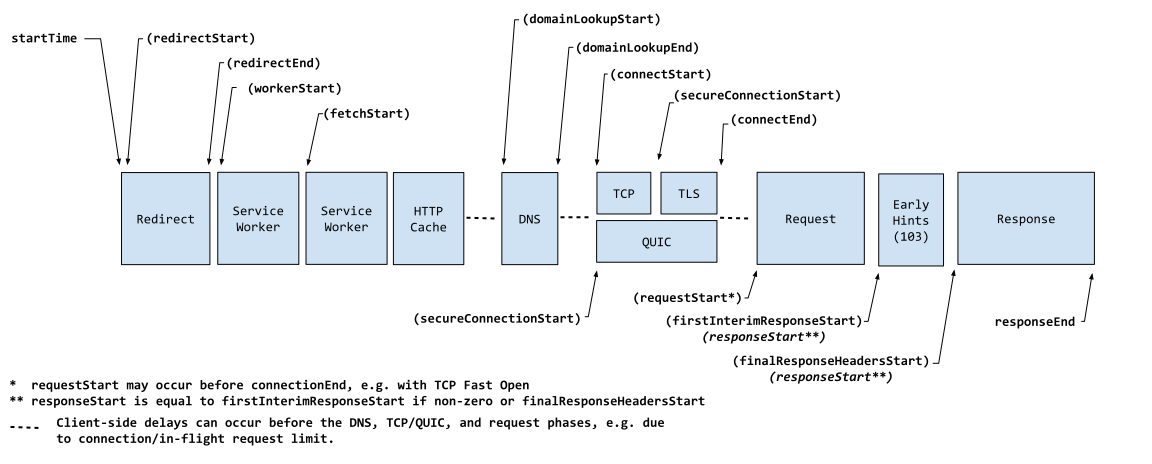
redirectStartRead only- : A
DOMHighResTimeStampthat represents the start time of the fetch which initiates the redirect.
- : A
redirectEndRead only- : A
DOMHighResTimeStampimmediately after receiving the last byte of the response of the last redirect.
- : A
workerStartRead only- : Returns a
DOMHighResTimeStampimmediately before dispatching theFetchEventif a Service Worker thread is already running, or immediately before starting the Service Worker thread if it is not already running. If the resource is not intercepted by a Service Worker the property will always return 0.
- : Returns a
fetchStartRead only- : A
DOMHighResTimeStampimmediately before the browser starts to fetch the resource.
- : A
domainLookupStartRead only- : A
DOMHighResTimeStampimmediately before the browser starts the domain name lookup for the resource.
- : A
domainLookupEndRead only- : A
DOMHighResTimeStamprepresenting the time immediately after the browser finishes the domain name lookup for the resource.
- : A
connectStartRead only- : A
DOMHighResTimeStampimmediately before the browser starts to establish the connection to the server to retrieve the resource.
- : A
secureConnectionStartRead only- : A
DOMHighResTimeStampimmediately before the browser starts the handshake process to secure the current connection.
- : A
connectEndRead only- : A
DOMHighResTimeStampimmediately after the browser finishes establishing the connection to the server to retrieve the resource.
- : A
requestStartRead only- : A
DOMHighResTimeStampimmediately before the browser starts requesting the resource from the server.
- : A
firstInterimResponseStartRead only- : A
DOMHighResTimeStampthat represents the interim response time (for example, 100 Continue or 103 Early Hints).
- : A
responseStartRead only- : A
DOMHighResTimeStampimmediately after the browser receives the first byte of the response from the server (which may be an interim response).
- : A
finalResponseHeadersStartRead only- : A
DOMHighResTimeStampthat represents the final headers response time (for example, 200 Success), after any interim response time.
- : A
responseEndRead only- : A
DOMHighResTimeStampimmediately after the browser receives the last byte of the resource or immediately before the transport connection is closed, whichever comes first.
- : A
Additional resource information
Additionally, this interface exposes the following properties containing more information about a resource:
contentTypeRead only- : A string representing a minimized and standardized version of the MIME-type of the fetched resource.
decodedBodySizeRead only- : A number that is the size (in octets) received from the fetch (HTTP or cache) of the message body, after removing any applied content encoding.
deliveryTypeRead only- : Indicates how the resource was delivered — for example from the cache or from a navigational prefetch.
encodedBodySizeRead only- : A number representing the size (in octets) received from the fetch (HTTP or cache), of the payload body, before removing any applied content encodings.
initiatorTypeRead only- : A string representing the web platform feature that initiated the performance entry.
nextHopProtocolRead only- : A string representing the network protocol used to fetch the resource, as identified by the ALPN Protocol ID (RFC7301).
renderBlockingStatusRead only- : A string representing the render-blocking status. Either
"blocking"or"non-blocking".
- : A string representing the render-blocking status. Either
responseStatusRead only- : A number representing the HTTP response status code returned when fetching the resource.
transferSizeRead only- : A number representing the size (in octets) of the fetched resource. The size includes the response header fields plus the response payload body.
serverTimingRead only- : An array of
PerformanceServerTimingentries containing server timing metrics.
- : An array of
Instance methods
toJSON()- : Returns a JSON representation of the
PerformanceResourceTimingobject.
- : Returns a JSON representation of the
Examples
Logging resource timing information
Example using a PerformanceObserver, which notifies of new resource performance entries as they are recorded in the browser’s performance timeline. Use the buffered option to access entries from before the observer creation.
const observer = new PerformanceObserver((list) => {
  list.getEntries().forEach((entry) => {
    console.log(entry);
  });
});

observer.observe({ type: "resource", buffered: true });
Example using getEntriesByType(), which only shows resource performance entries present in the browser’s performance timeline at the time you call this method:
const resources = performance.getEntriesByType("resource");
resources.forEach((entry) => {
  console.log(entry);
});