
css property
`font-kerning` CSS property
The font-kerning CSS property sets the use of the kerning information stored in a font.
Interactive exampleOpen the canonical MDN source to run this embedded demo.
font-kerning: auto;
font-kerning: normal;
font-kerning: none;
<section class="default-example" id="default-example">
  <div class="transition-all" id="example-element">
    "We took Tracy to see 'THE WATERFALL' in W. Virginia."
  </div>
</section>
section {
  font-family: serif;
}
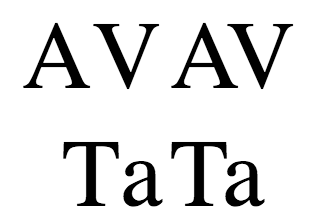
Kerning affects how letters are spaced. In well-kerned fonts, this feature makes character spacing more uniform and pleasant to read by reducing white space between certain character combinations.
In the image below, for instance, the examples on the left do not use kerning, while the ones on the right do:
Syntax
font-kerning: auto;
font-kerning: normal;
font-kerning: none;

/* Global values */
font-kerning: inherit;
font-kerning: initial;
font-kerning: revert;
font-kerning: revert-layer;
font-kerning: unset;
Values
This property is specified as one of the following keyword values:
auto- : The browser determines whether font kerning should be used or not. For example, some browsers will disable kerning on small fonts, since applying it could harm the readability of text.
normal- : Font kerning information stored in the font must be applied.
none- : Font kerning information stored in the font is disabled.
Formal definition
Formal syntax
Examples
Enabling and disabling kerning
HTML
<div id="kern"></div>
<div id="no-kern"></div>
<textarea id="input">AV T. ij</textarea>
CSS
div {
  font-size: 2rem;
  font-family: serif;
}

#no-kern {
  font-kerning: none;
}

#kern {
  font-kerning: normal;
}
JavaScript
const input = document.getElementById("input");
const kern = document.getElementById("kern");
const noKern = document.getElementById("no-kern");

input.addEventListener("keyup", () => {
  kern.textContent = input.value; /* Update content */
  noKern.textContent = input.value;
});

kern.textContent = input.value; /* Initialize content */
noKern.textContent = input.value;
Interactive exampleOpen the canonical MDN source to run this embedded demo.
Specifications
SpecificationsStandards references are available on the canonical MDN page.
Browser compatibility
Browser compatibilityCompatibility data is available on the canonical MDN page.