
css property
`line-height-step` CSS property
Limited availability
The line-height-step CSS property sets the step unit for line box heights. When the property is set, line box heights are rounded up to the closest multiple of the unit.
Syntax
/* Point values */
line-height-step: 18pt;

/* Global values */
line-height-step: inherit;
line-height-step: initial;
line-height-step: revert;
line-height-step: revert-layer;
line-height-step: unset;
The line-height-step property is specified as any one of the following:
- a
<length>.
Values
<length>- : The specified
<length>is used in the calculation of the line box height step.
- : The specified
Formal definition
Formal syntax
Examples
Setting step unit for line box height
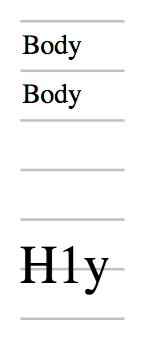
In the following example, the height of line box in each paragraph is rounded up to the step unit. The line box in <h1> does not fit into one step unit and thus occupies two, but it is still centered within the two step unit.
:root {
  font-size: 12pt;
  --my-grid: 18pt;
  line-height-step: var(--my-grid);
}
h1 {
  font-size: 20pt;
  margin-top: calc(2 * var(--my-grid));
}
The result of these rules is shown below in the following screenshot:
Specifications
Currently, no browsers support this feature.
Browser compatibility
Browser compatibilityCompatibility data is available on the canonical MDN page.
See also
fontfont-sizeline-height- CSS Rhythmic Sizing specification