
css property
`margin-bottom` CSS property
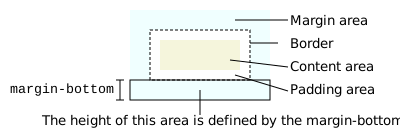
The margin-bottom CSS property sets the margin area on the bottom of an element. A positive value places it farther from its neighbors, while a negative value places it closer.
Interactive exampleOpen the canonical MDN source to run this embedded demo.
margin-bottom: 1em;
margin-bottom: 10%;
margin-bottom: 10px;
margin-bottom: 0;
<section id="default-example">
  <div id="container">
    <div class="row"></div>
    <div class="row transition-all" id="example-element"></div>
    <div class="row"></div>
  </div>
</section>
#container {
  width: 300px;
  height: 200px;
  display: flex;
  align-content: flex-start;
  flex-direction: column;
  justify-content: flex-start;
}

.row {
  height: 33.33%;
  display: inline-block;
  border: solid #ce7777 10px;
  background-color: #2b3a55;
  flex-shrink: 0;
}

#example-element {
  border: solid 10px #ffbf00;
  background-color: #2b3a55;
}
This property has no effect on non-replaced inline elements, such as <span> or <code>.
Syntax
/* <length> values */
margin-bottom: 10px; /* An absolute length */
margin-bottom: 1em; /* relative to the text size */
margin-bottom: 5%; /* relative to the nearest block container's width */
margin-bottom: anchor-size(width);
margin-bottom: calc(anchor-size(--my-anchor self-block, 20px) / 3);

/* Keyword values */
margin-bottom: auto;

/* Global values */
margin-bottom: inherit;
margin-bottom: initial;
margin-bottom: revert;
margin-bottom: revert-layer;
margin-bottom: unset;
The margin-bottom property is specified as the keyword auto, or a <length>, or a <percentage>. Its value can be positive, zero, or negative.
Values
-
- : The size of the margin as a fixed value.
- For anchor-positioned elements, the
anchor-size()function resolves to a<length>value relative to the associated anchor element’s width or height (see Setting element margin based on anchor size).
- For anchor-positioned elements, the
- : The size of the margin as a fixed value.
-
- : The size of the margin as a percentage, relative to the inline size (width in a horizontal language, defined by
writing-mode) of the containing block.
- : The size of the margin as a percentage, relative to the inline size (width in a horizontal language, defined by
-
auto- : The browser selects a suitable value to use. See
margin.
- : The browser selects a suitable value to use. See
Formal definition
Formal syntax
Examples
Setting positive and negative bottom margins
HTML
<div class="container">
  <div class="box0">Box 0</div>
  <div class="box1">Box 1</div>
  <div class="box2">Box one's negative margin pulls me up</div>
</div>
CSS
CSS for divs to set margin-bottom and height
.box0 {
  margin-bottom: 1em;
  height: 3em;
}
.box1 {
  margin-bottom: -1.5em;
  height: 4em;
}
.box2 {
  border: 1px dashed black;
  border-width: 1px 0;
  margin-bottom: 2em;
}
Some definitions for container and divs so margins’ effects can be seen more clearly
.container {
  background-color: orange;
  width: 320px;
  border: 1px solid black;
}
div {
  width: 320px;
  background-color: gold;
}
Result
Interactive exampleOpen the canonical MDN source to run this embedded demo.
Specifications
SpecificationsStandards references are available on the canonical MDN page.
Browser compatibility
Browser compatibilityCompatibility data is available on the canonical MDN page.
See also
margin-top,margin-right, andmargin-leftmarginshorthandmargin-block-start,margin-block-end,margin-inline-start, andmargin-inline-endmargin-blockandmargin-inlineshorthands- CSS box model module