
css property
`ruby-position` CSS property
The ruby-position CSS property defines the position of a ruby element relative to its base element. It can be positioned over the element (over), under it (under), or to the right (inter-character).
Interactive exampleOpen the canonical MDN source to run this embedded demo.
ruby-position: over;
ruby-position: under;
<section id="default-example">
  <ruby id="example-element"> 明日 <rp>(</rp><rt>Ashita</rt><rp>)</rp> </ruby>
</section>
#example-element {
  font-size: 2em;
}
Syntax
/* Keyword values */
ruby-position: over;
ruby-position: under;
ruby-position: alternate;
ruby-position: alternate over;
ruby-position: alternate under;
ruby-position: inter-character;

/* Global values */
ruby-position: inherit;
ruby-position: initial;
ruby-position: revert;
ruby-position: revert-layer;
ruby-position: unset;
Values
This property is specified as one of the following keyword values:
over- :
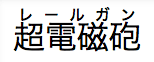 Is a keyword indicating that the ruby has to be placed over the main text for horizontal scripts and right to it for vertical scripts.
- :
under- :
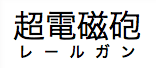 Is a keyword indicating that the ruby has to be placed under the main text for horizontal scripts and left to it for vertical scripts.
- :
alternate- : Is a keyword indicating that the ruby alternates between over and under, when there are multiple levels of annotation.
inter-character- : Is a keyword indicating that the ruby annotation is placed to the right of the base text characters. This value is intended for bopomofo (zhuyin fuhao) ruby.
Formal definition
Formal syntax
Examples
Ruby positioned over the text
HTML
<ruby>
  <rb>超電磁砲</rb>
  <rp>(</rp><rt>レールガン</rt><rp>)</rp>
</ruby>
CSS
ruby {
  ruby-position: over;
}
Result
Interactive exampleOpen the canonical MDN source to run this embedded demo.
Ruby positioned under the text
HTML
<ruby>
  <rb>超電磁砲</rb>
  <rp>(</rp><rt>レールガン</rt><rp>)</rp>
</ruby>
CSS
ruby {
  ruby-position: under;
}
Result
Interactive exampleOpen the canonical MDN source to run this embedded demo.
Ruby alternate
HTML
<ruby>
  <rb>A</rb><rb>B</rb><rb>C</rb>
  <rtc>Above</rtc>
  <rtc>Below</rtc>
</ruby>
CSS
ruby {
  ruby-position: alternate; /* this is also the initial value */
}
Result
Interactive exampleOpen the canonical MDN source to run this embedded demo.
Specifications
SpecificationsStandards references are available on the canonical MDN page.
Browser compatibility
Browser compatibilityCompatibility data is available on the canonical MDN page.
See also
<ruby>,<rt>,<rp>, and<rtc>HTML elementsruby-align- CSS ruby layout module