
css type
`<shape>` CSS type
The <shape> CSS data type defines the specific form (shape) of a region. The region represents the part of an element to which the clip property applies.
[!NOTE]
<shape>andrect()work in conjunction withclip, which has been deprecated in favor ofclip-path. When possible, useclip-pathand thebasic-shapedata type instead.
Syntax
The <shape> data type is specified using the rect() function, which produces a region in the form of a rectangle.
rect()
rect(top, right, bottom, left)
Values
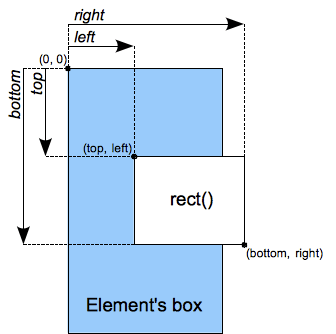
- top
- : Is a
lengthrepresenting the offset for the top of the rectangle relative to the top border of the element’s box.
- : Is a
- right
- : Is a
lengthrepresenting the offset for the right of the rectangle relative to the left border of the element’s box.
- : Is a
- bottom
- : Is a
lengthrepresenting the offset for the bottom of the rectangle relative to the top border of the element’s box.
- : Is a
- left
- : Is a
lengthrepresenting the offset for the left of the rectangle relative to the left border of the element’s box.
- : Is a
Interpolation
When animated, values of the <shape> data type are interpolated over their top, right, bottom, and left components, each treated as a real, floating-point number. The speed of the interpolation is determined by the easing function associated with the animation.
Example
Example demonstrating correct use of the rect() function
img.clip04 {
  clip: rect(10px, 20px, 20px, 10px);
}
Specifications
SpecificationsStandards references are available on the canonical MDN page.
Browser compatibility
Browser compatibilityCompatibility data is available on the canonical MDN page.
See also
- Related CSS property:
clip